University of Michigan
University of Michigan
Final Capstone Product
Final Capstone Product
Final Capstone Product
Background
Background
As a part of my final project in my Masters of Science in Information from the University of Michigan, I worked with a team of 3 other students (Elizabeth Riddle, Emmy Thompson, and Stephanie Tong), to research accessibility in video games.
As a part of my final project in my Masters of Science in Information from the University of Michigan, I worked with a team of 3 other students (Elizabeth Riddle, Emmy Thompson, and Stephanie Tong), to research accessibility in video games.
My Role
My Role
As this was a school project, we all shared responsibilities for assignments. However, in addition to our shared responsibilities, I also:
designed both the low and high fidelity prototypes of our product
wrote our product realization plan
created our product demo and pitch
This product pitch won 1st place out of all Master's capstone projects in the University of Michigan School of Information Student Expo (100+ entries).
designed both the low and high fidelity prototypes of our product
wrote our product realization plan
create our product demo and pitch
This product pitch won 1st place out of all Master's capstone projects in the University of Michigan School of Information Student Expo (100+ entries).
Problem
Problem
Nearly 23 million people who play video games have a visual impairment. Despite this large user base, video games are often not accessible to players with low vision. Even though accessibility guidelines for video games do exist, they are not widespreadly implemented, and our competitive analysis showed that nearly 80% of 15 games that appealed to this user base lacked some or all recommended accessibility features for low vision.
Nearly 23 million people who play video games have a visual impairment. Despite this large user base, video games are often not accessible to players with low vision. Our competitive analysis showed that nearly 80% of 15 games that appealed to this user base lacked some or all recommended accessibility features for low vision.
User Research
User Research
Our team conducted 4 user interviews, 4 user testing sessions, and 2 field observations to learn about 3 main research questions:
What strategies do people with low vision employ to navigate space in real life and digitally?
The goal of this question is to learn about potential features that may build off of current skills in this user base.
What areas of gameplay can be changed to improve learning curves using asset based design for people with low vision?
The goal of this question is to learn about pain points users have when playing video games.
What game genres, platforms, and titles are most appealing to low vision players?
The goal of this question is to scope the potential product down from video games generally to a specific type of game that would have the most impact to this playerbase.
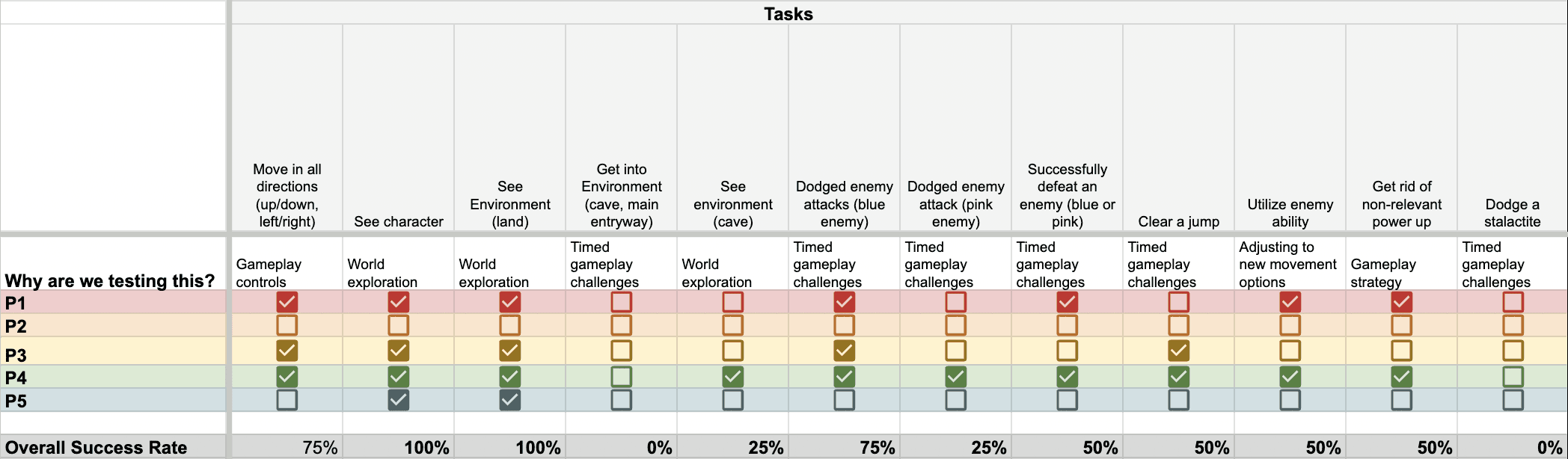
To synthesize our findings we used an affinity map for user interviews and a rainbow sheet (pictured below) for user testing.
Our team conducted 4 user interviews, 4 user testing sessions, and 2 field observations to learn about 3 main research questions to learn about the current state of low vision gaming and pain points.
To synthesize our findings we used an affinity map for user interviews and a rainbow sheet (click here to open in new tab) for user testing.
We found that:
Low-vision players heavily rely on past experiences to assess new digital spaces, game environments, and mechanics (RQ1).
Vision, hearing, and touch are all used to help orient the player (RQ1).
Real time action, combat, and other parts of gameplay that are either timed or involve live interpretation of information could be more accessible to this playerbase (RQ2).
Players are motivated by exploring the new world of a video game. While winning is important for players, it’s not everything (RQ3).
Low vision players are not a monolith. Individuals in the community have different needs from each other depending on vision type (RQ2)
Brainstorming
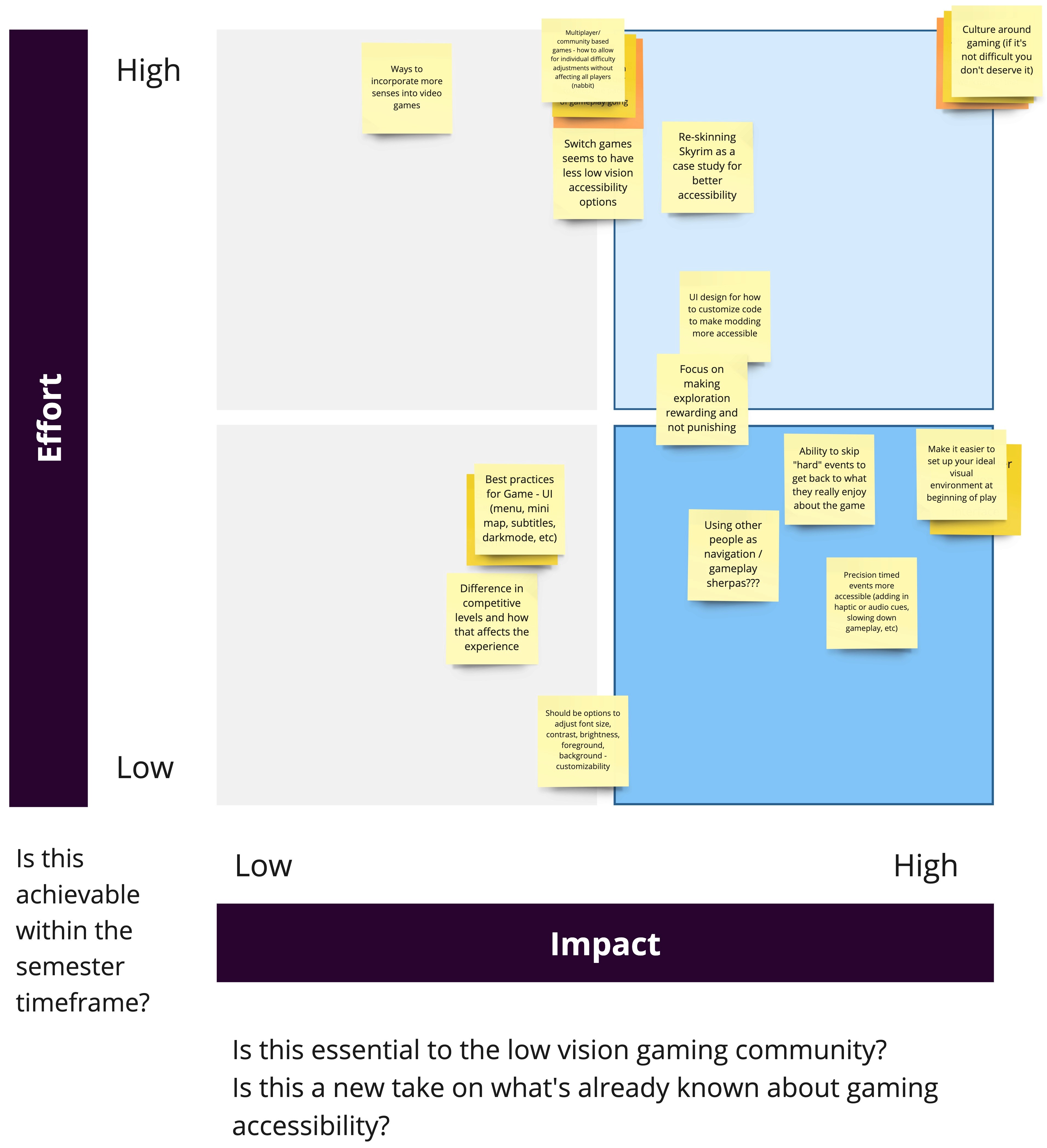
Using findings uncovered from our user interviews, we created a brainstorming table. As a team, we took these features and mapped them to a matrix with two axes, effort and impact (pictured below)
There were 3 main findings from our low fidelity tests that helped inform design decisions in the high fidelity prototype:
Some low vision players can only focus on a limited area of a screen at a time.
Recognition is easier than recall.
Preference patterns exist based on vision type.
Customizability
Because we found that low vision players are not a monolith, we leaned into customizability. Players can pick the size, location, color, and more of each informational element.
Preset views
Despite being a diverse group, there are some views, such as moving all elements to the center, that help multiple types of low vision.
Menu Voiceover
Adding voiceover support helps players who may rely on audio feedback to navigate digital spaces.
From our research we formed our main problem statement: Interpreting game information is a barrier to entry to enjoying and playing video games.
In addition, we found that:
Low-vision players heavily rely on past experiences to assess new digital spaces, game environments, and mechanics (RQ1).
Vision, hearing, and touch are all used to help orient the player (RQ1).
Real time action, combat, and other parts of gameplay that are either timed or involve live interpretation of information could be more accessible to this playerbase (RQ2).
Players are motivated by exploring the new world of a video game. While winning is important for players, it’s not everything (RQ3).
Low vision players are not a monolith. Individuals in the community have different needs from each other depending on vision type (RQ2)
Through our competitive analysis and user interviews, we also developed 2 design requirements.
Our final design should meet the minimum requirements for low vision accessibility as outlined by the Xbox Accessibility Guidelines.
Because our research found that low vision varies between players, our solution needs to be customizable to suit each individual's needs.
Brainstorming
Using findings uncovered from our user interviews, we created a brainstorming table. Our table analyzed 4 stages of game play: starting the game, in game play (before real time action), in game play (during real time action), and post attempt (failure) to see how different features could support the player throughout gameplay. I also led a brainstorming session with a community participant who helped ideate and provide feedback on our ideas. As a team, we took these features and mapped them to a matrix with two axes, effort and impact (pictured below)
Realization Plan
As our goal was not to create a new game, but rather make games in general more accessible, a key part of our realization plan will be partnering with existing game developers for future implementation of this system.
Spread the word
Sharing out our research to influence the future creation of Heads Up Displays. We shared our research in the International Game Developers Association community on Discord which sparked conversation on accessibility design in video games.
Minimum Viable Product
Though a complete HUD customization system may be difficult to patch into a game after release, the presets feature is a lower engineering lift and still can improve accessibility for low vision players. By focusing on presets we will be more likely to see adoption in newer games.
Long Term
We’re proposing for our recommendations to be implemented as part of University of Michigan Electrical Engineering and Computer Science coursework, ideally as an unbranded HUD in Unreal or Unity game engines, which are the two most widely used game engines. Creating free to use HUD customization system templates in these engines will allow any game developer on these engines to plug them into the games that they are working on.
View Intuit Case Study
View Zillow Case Study
Impact
Awards
This product was awarded the 1st place prize for all final projects in the University of Michigan School of Information Student Expo (1st out of over 100 attendees).
Spreading the word
By sharing our research with the gaming community, we contribute to the developing accessibility conversations.
Innovation
Our HUD concept builds upon existing industry best practices, but applies them in a new and often overlooked way to support low-vision players gaming needs. This concept empowers players to own more of their gaming experience.
Inclusion
By vocalizing the needs of these players and showing game developers how they can build accessibility into games, we can make the gaming community more inclusive to the 23 million players who have low vision.
Our final concept was a fully customizable Heads Up Display that allows users to edit the size, color, location, and other visual cues of all elements.
Low Fidelity User Testing
Low Fidelity User Testing
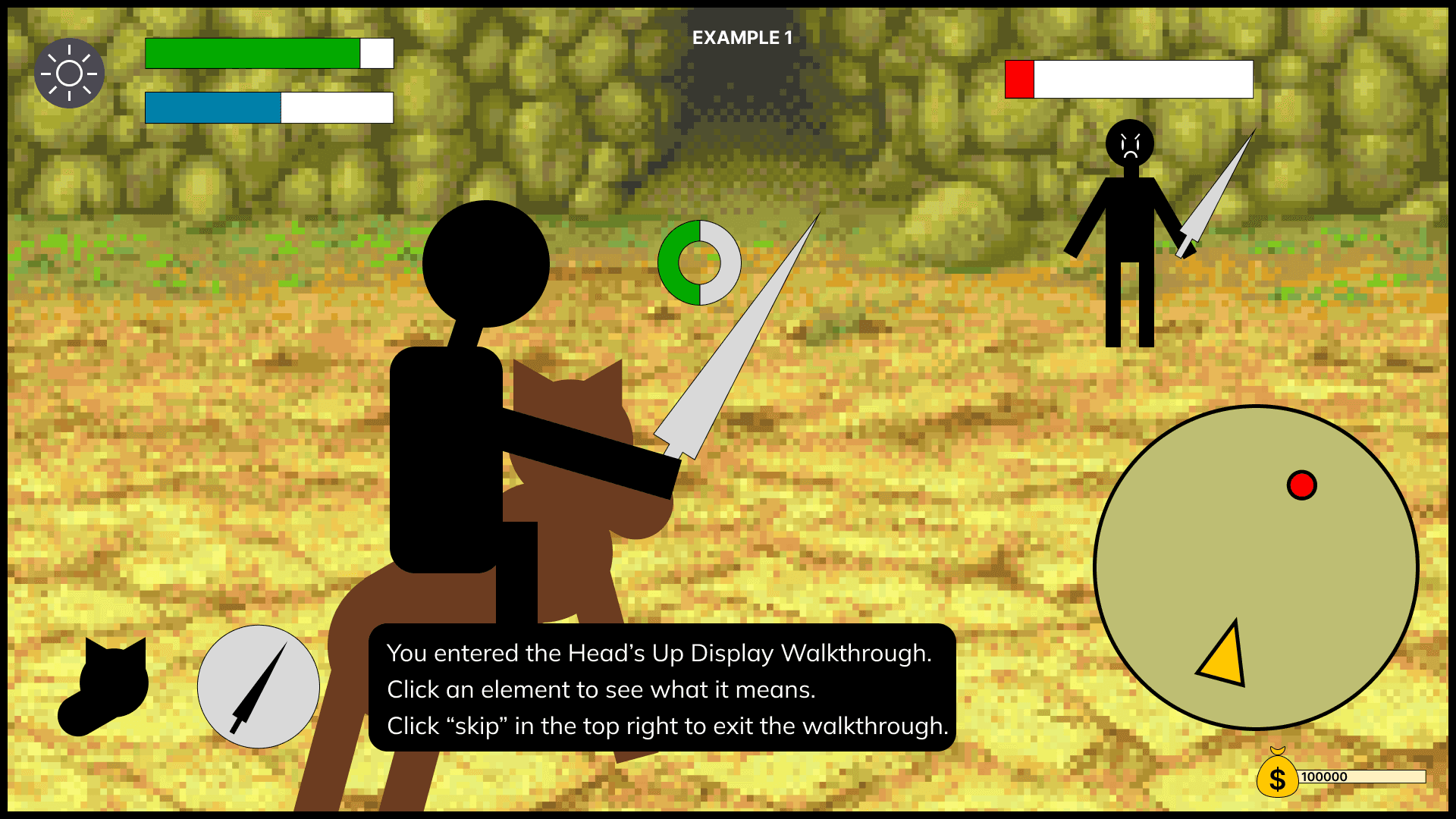
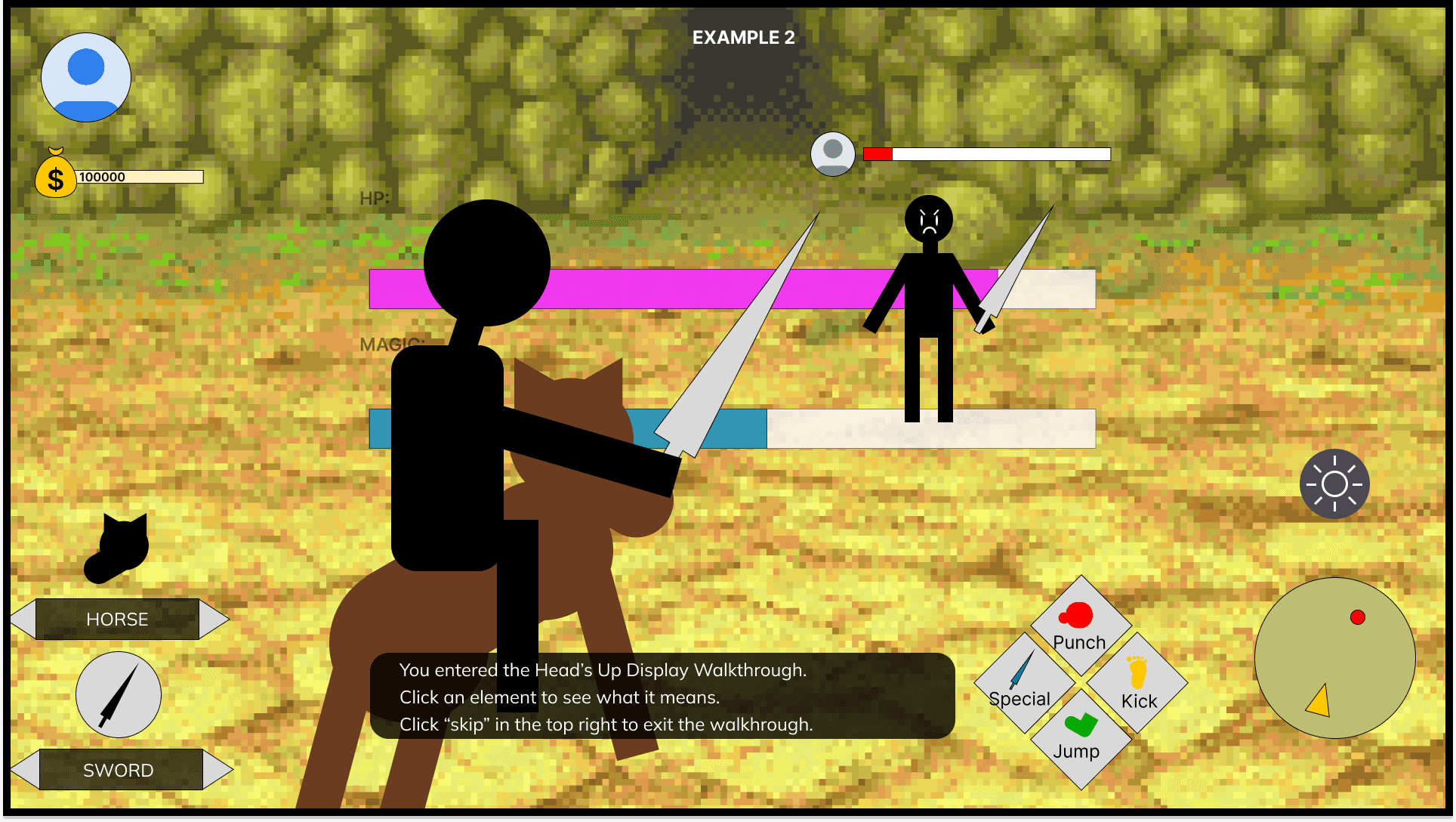
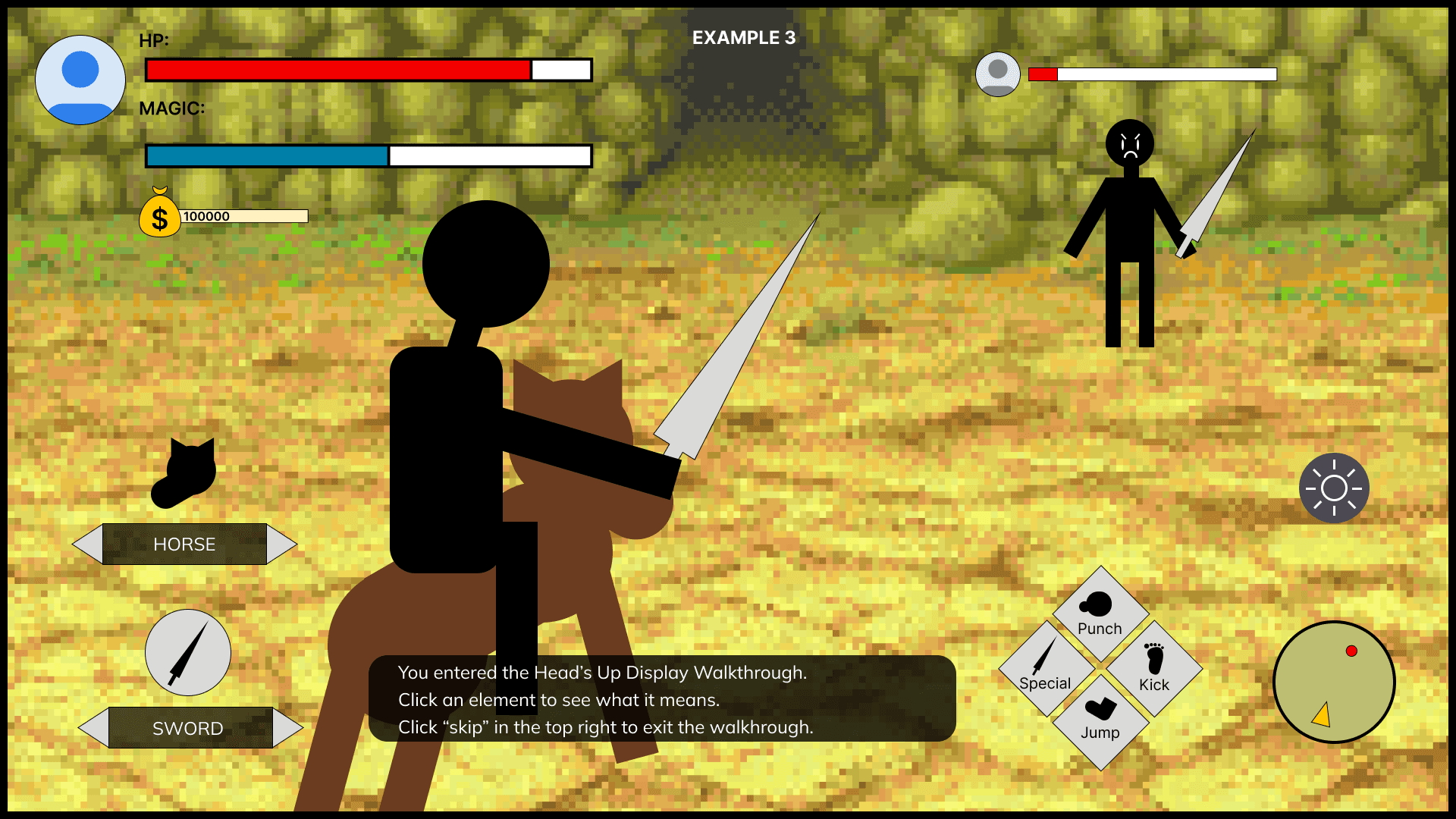
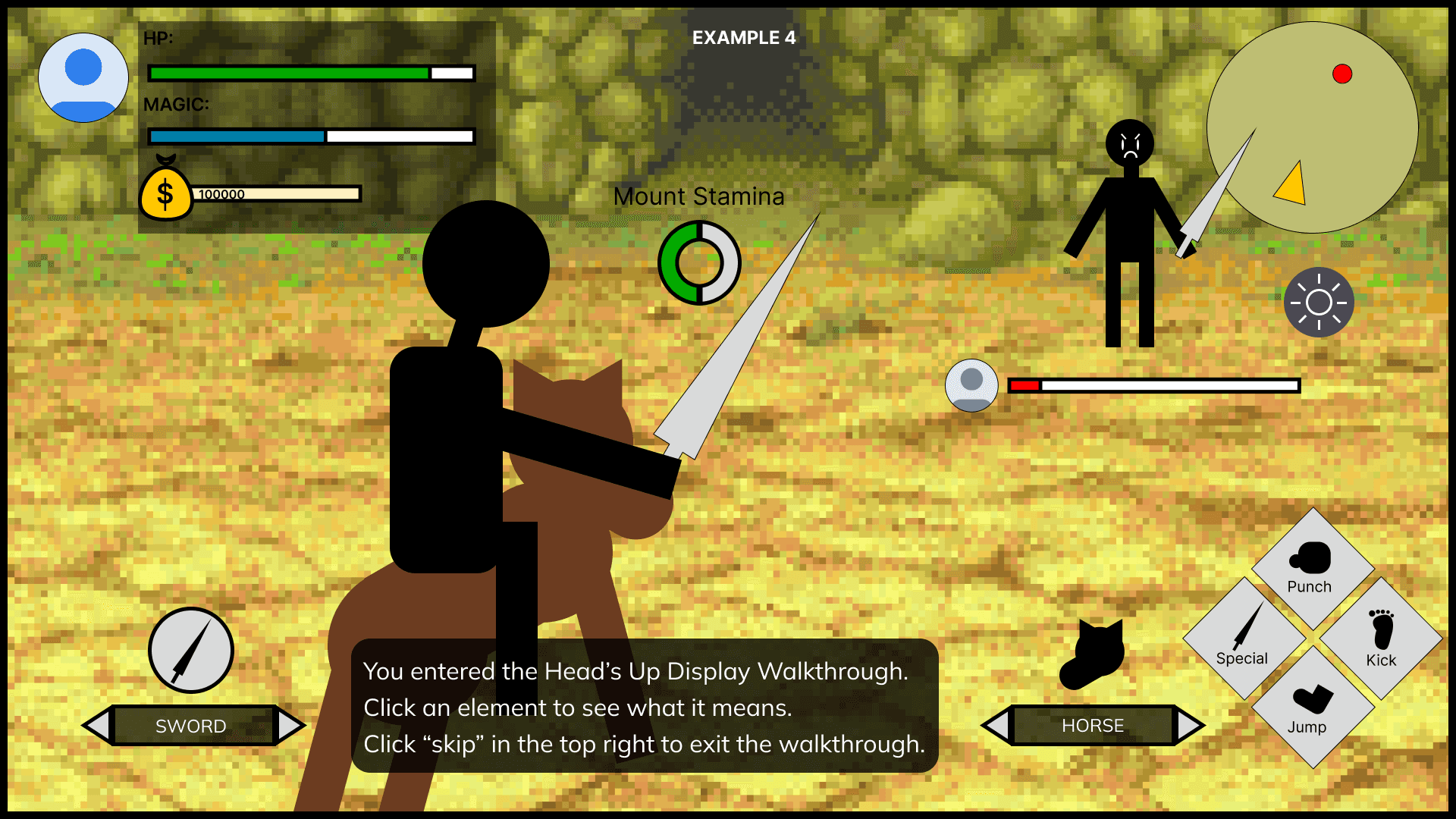
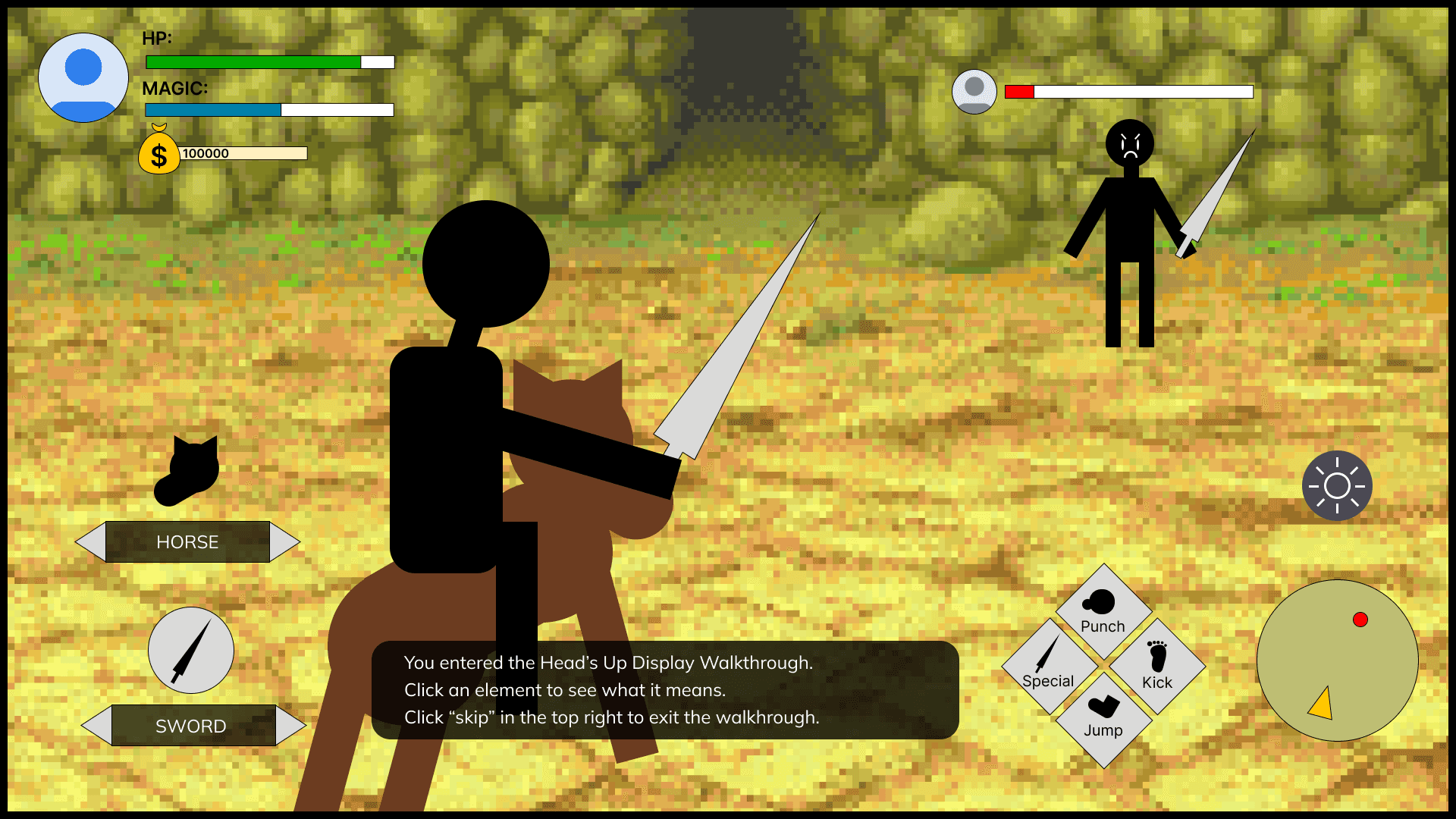
I developed our low fidelity concept to be simple and flexible. To effectively test our concept, it needed to be able to emulate the feeling of having full visual control over a game’s Heads Up Display (HUD).
First, I reviewed popular open world game’s heads up displays to find common elements. Then I created a mock up of a common fight scene in a video game. To test how users would react to being able to customize their screens, one member of my team would screen share the prototype with the user while another team member was editing the file based on the user’s requests live in Figma. In this way we were able to collect information on what edits were needed to make the HUD view accessible to the user, how the user would react to being able to customize their displays to this degree, and other feedback on how they believed customization would affect their gameplay.
Below are some examples of before and after displays and the edits that were made:
I developed our low fidelity concept to be simple and flexible.
Below are some examples of before and after displays and the edits that were made:
Using a heat map, we were able to quantify where users were commonly moving items.
There were 3 main findings from our low fidelity tests that helped inform design decisions in the high fidelity prototype:
Some low vision players can only focus on a limited area of a screen at a time. Important information should stay on a similar portion of the screen to ensure it stays in the player's line of vision.
Recognition is easier than recall. Saying anything is customizable is overwhelming. Users liked being provided a recommendation then accessing fit rather than having a blank slate.
Preference patterns exist based on vision type. Though low vision players are not a monolith, patterns emerged on where elements were commonly placed, how they were colored, or how they were sized.
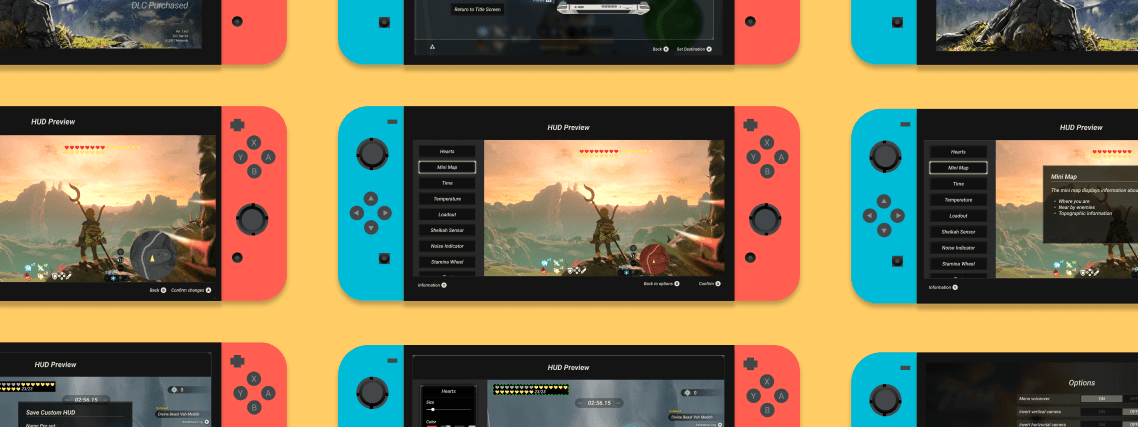
Our high fidelity prototype uses the Breath of the Wild UI kit made by Hunter Paramore to illustrate how this system could fit into a real game.
Final Product Features
Final Product Features
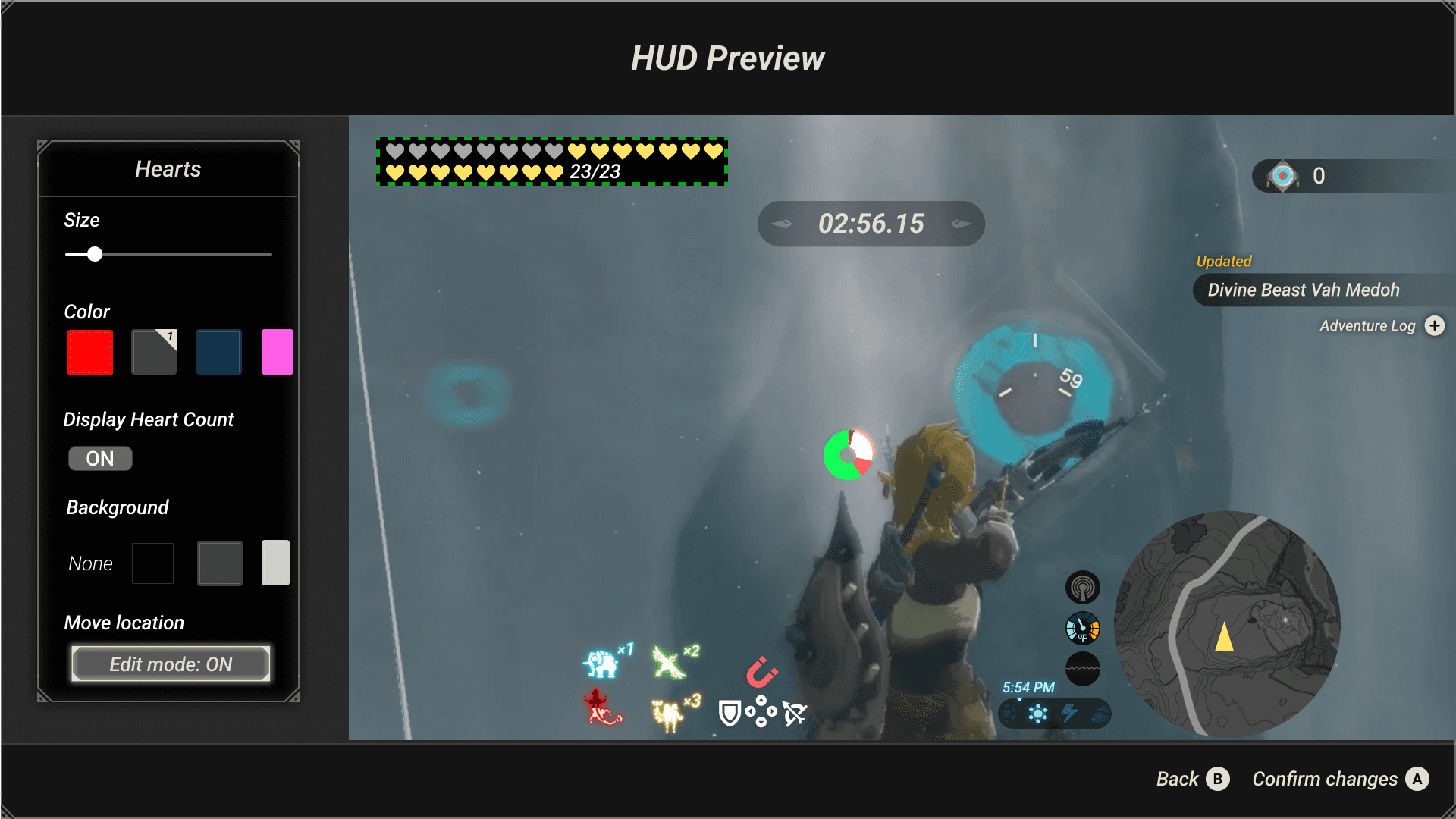
Customization
As low vision players are not a monolith and have unique vision needs, our final product allows users to customize all visual elements inside of their Heads Up Display.
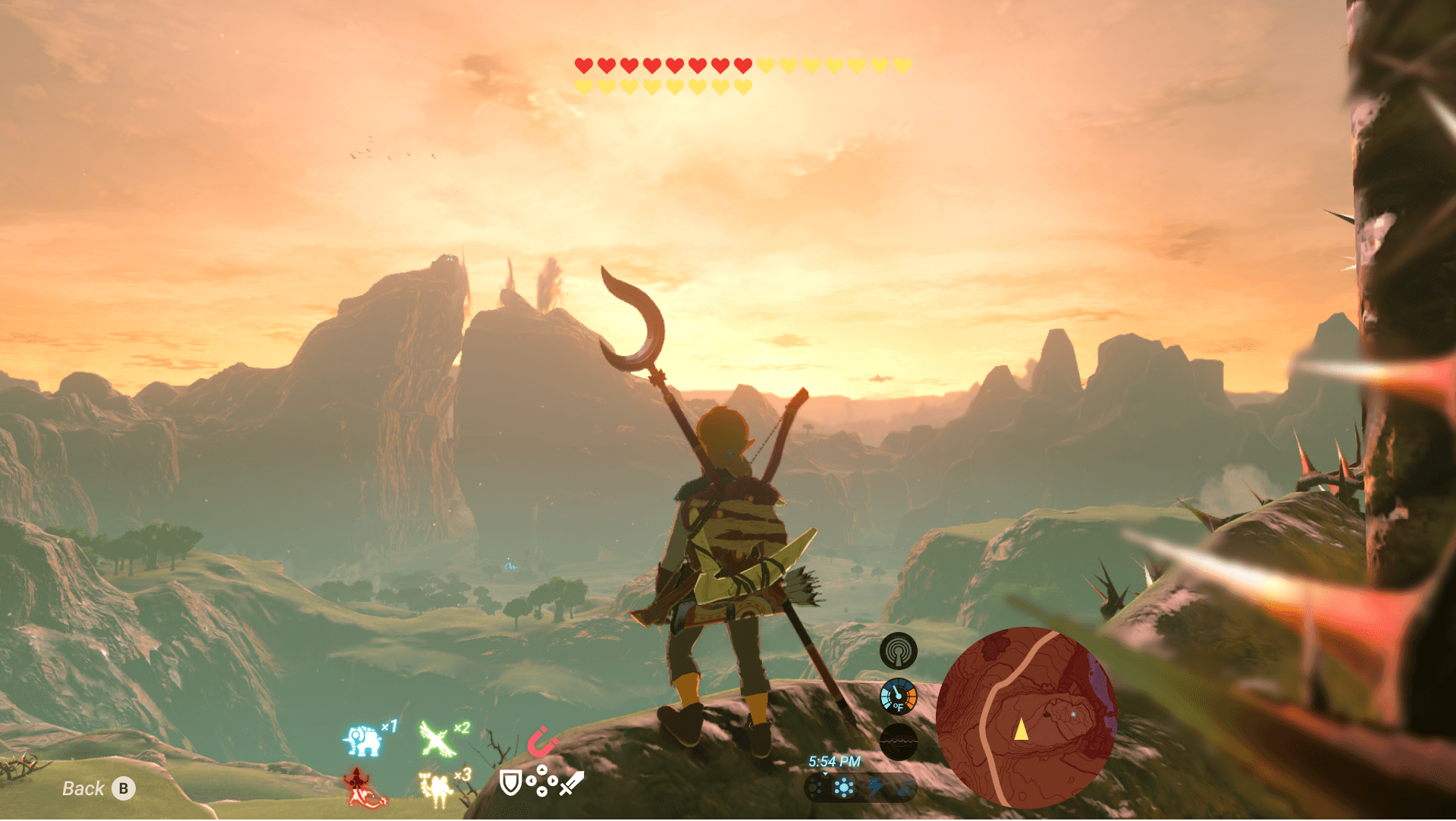
Preset Views
As users can get overwhelmed with choice when told "anything is customizable," our product will give more bases for customization to start off from. The example shown, center mode, moves all informational elements to the center. This helps both people with rapid eye movements and people with tunnel vision.
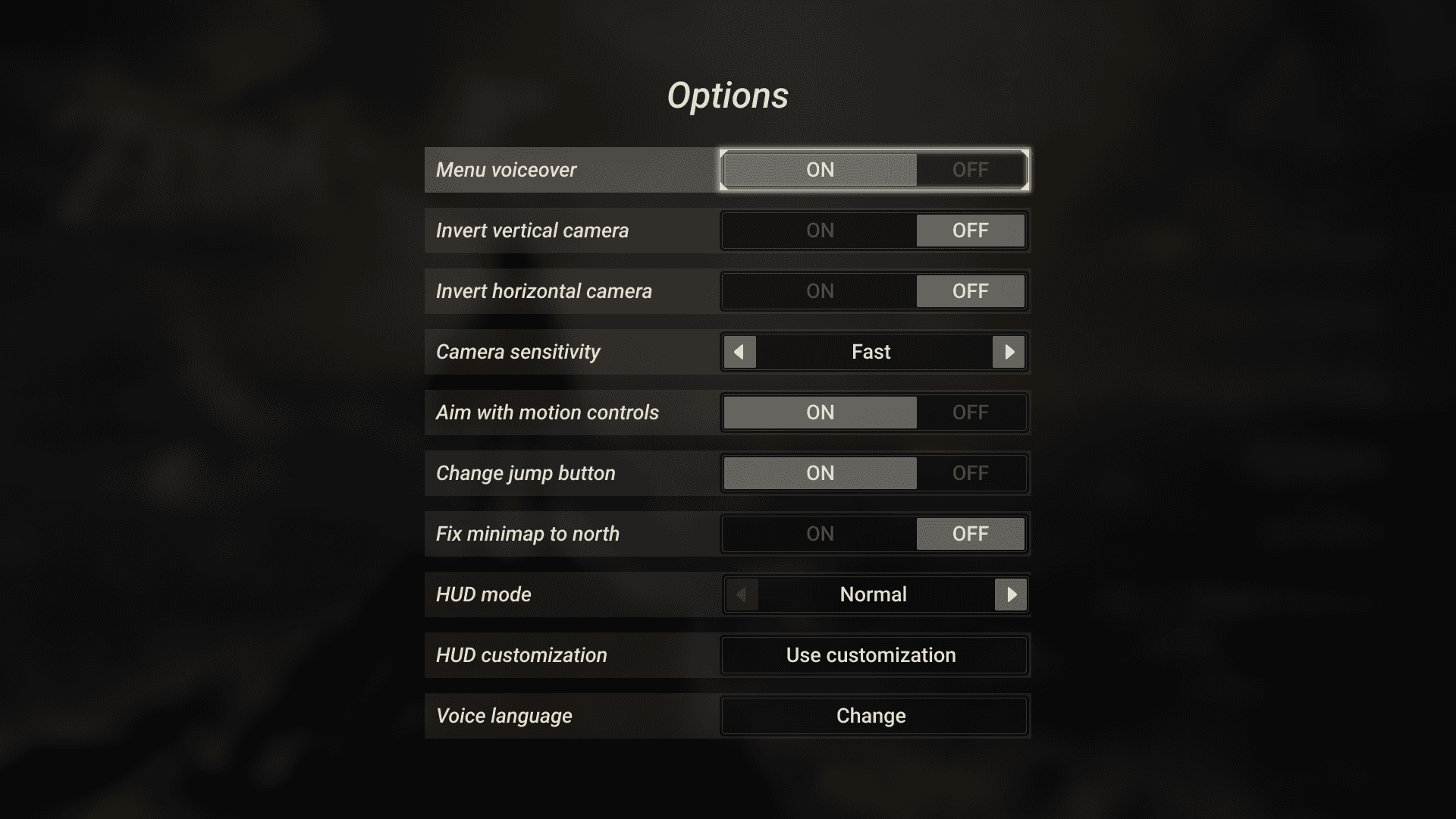
Menu Voiceover
As our research found that other sense, such as hearing, were used to support low vision players when navigating spaces, the final product includes an option to turn on voiceover. The voiceover will read aloud what the user is highlighted on.
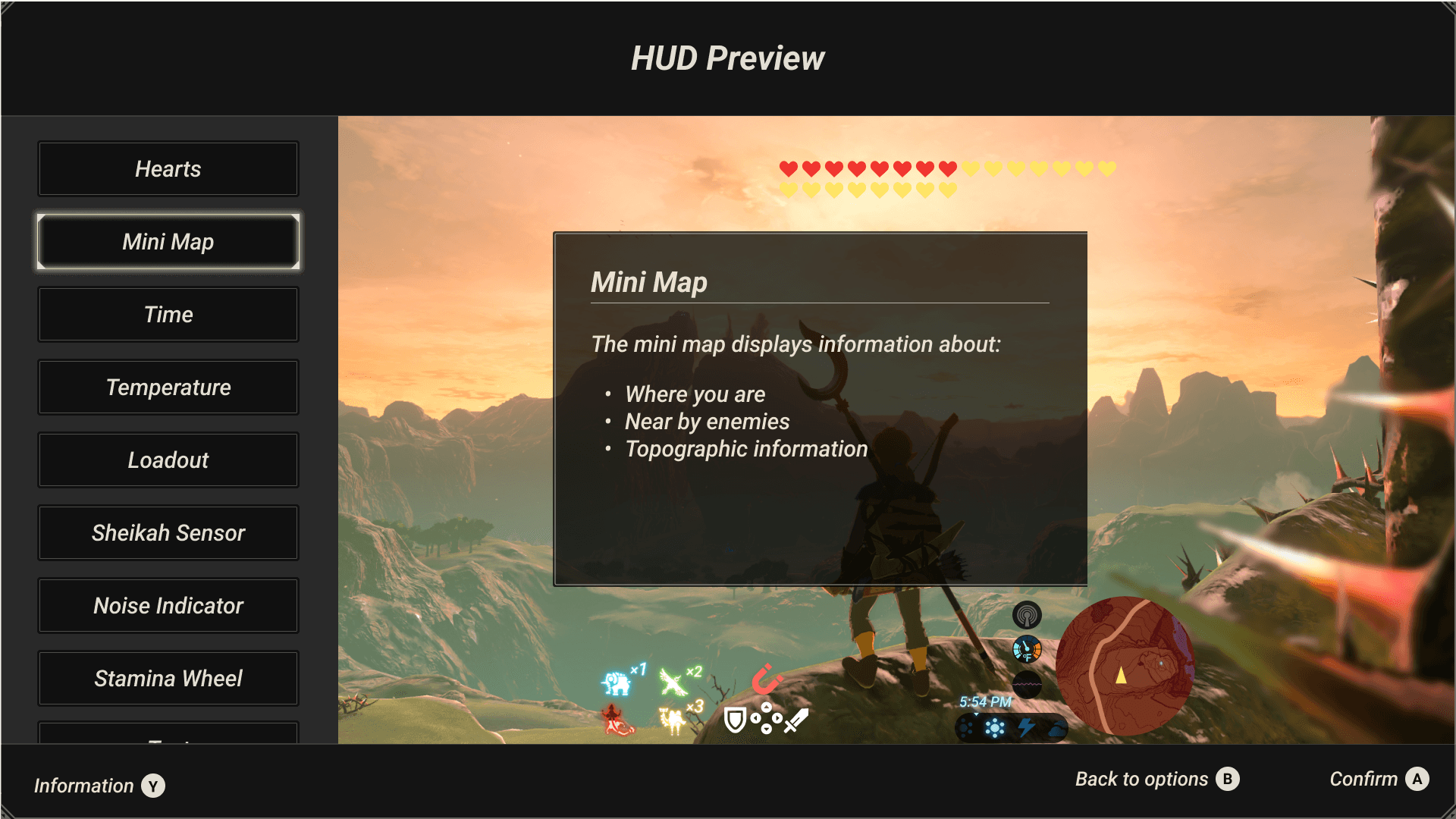
Location Consistency
As our research found that some low vision players cannot see their whole screen without physically moving their head, the final product design keeps important information in the same visual location. This limits the need for the user to continuously change their field of vision when working with this product.
To see a detailed video walkthrough of our product, click here.
Realization Plan
Realization Plan
As our goal was not to create a new game, but rather make games in general more accessible, a key part of our realization plan will be partnering with existing game developers for future implementation of this system.
Spread the word
Sharing out our research to influence the future creation of Heads Up Displays. We shared our research in the International Game Developers Association community on Discord which sparked conversation on accessibility design in video games.
Minimum Viable Product
Though a complete HUD customization system may be difficult to patch into a game after release, the presets feature is a lower engineering lift and still can improve accessibility for low vision players. By focusing on presets we will be more likely to see adoption in existing games.
Long Term
We’re proposing for our recommendations to be implemented as part of University of Michigan Electrical Engineering and Computer Science coursework, ideally as an unbranded HUD in Unreal or Unity game engines, which are the two most widely used game engines. Creating free to use HUD customization system templates in these engines will allow any game developer on these engines to plug them into the games that they are working on.
As our goal was not to create a new game, but rather make games in general more accessible, a key part of our realization plan will be partnering with existing game developers for future implementation of this system.
Spread the word
We shared our research in the International Game Developers Association community on Discord which sparked conversation on accessibility design in video games.
Minimum Viable Product
Though a complete HUD customization system may be difficult to patch into a game after release, the presets feature is a lower engineering lift and still can improve accessibility for low vision players. By focusing on presets we will be more likely to see adoption.
Long Term
We’re proposing for our recommendations to be implemented as part of University of Michigan Electrical Engineering and Computer Science coursework, ideally as an unbranded HUD in Unreal or Unity game engines. Creating free to use HUD customization system templates in these engines will allow any game developer on these engines to plug them into the games that they are working on.
Impact
Impact
Awards
This product was awarded the 1st place prize for all final projects in the University of Michigan School of Information Student Expo (1st out of over 100 attendees).
Spreading the word
By sharing our research with the gaming community, we contribute to the developing accessibility conversations.
Innovation
Our HUD concept builds upon existing industry best practices, but applies them in a new and often overlooked way to support low-vision players gaming needs. This concept empowers players to own more of their gaming experience.
Inclusion
By vocalizing the needs of these players and showing game developers how they can build accessibility into games, we can make the gaming community more inclusive to the 23 million players who have low vision.
Awards
This product was awarded the 1st place prize for all final projects in the University of Michigan School of Information Student Expo (1st out of over 100 attendees).
Innovation
Our HUD concept builds upon existing industry best practices, but applies them in a new and often overlooked way to support low-vision players gaming needs. This concept empowers players to own more of their experience.
Inclusion
By vocalizing the needs of these players and showing game developers how they can build accessibility into games, we can make gaming more inclusive.

Intuit for Education
Product Manager
Redesigned content search workflow to improve user experience, leading to an 11% increase in search starts and a 5% increase in search completes.

Zillow Group
Product Manager, Hackweek